MCQ
Q.
In MS Word, which of the following is not a font style?
Correct Answer: C
The correct answer is Outline.
 Key Points
- Outline View
- The Outline view shows the different levels of headings as designated by the styles applied in your document.
- Headings are like titles in your document that explain the section of text to follow.
- Each heading in the Outline view is indicated by symbols.
- Bold, Italic and Underline font style in MS Word
- These commands are given in the Font group in the Home tab.
- Bold:
- It allows you to Bold the text of your document
- Italic:
- It allows you to Italicize the text of your document
- Underline:
- It allows you to underline the text of your document.
- Bold:
- These commands are given in the Font group in the Home tab.
 Additional Information
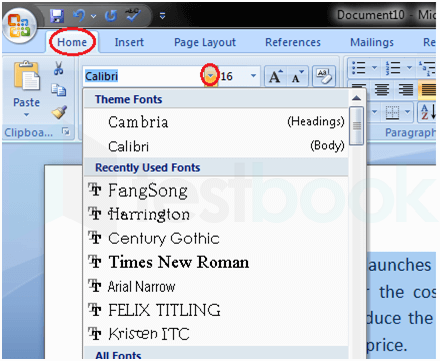
- The basic steps to change the font of a text in a document are given below;
- Select the text you want to modify
- Select the Home tab and locate the Font group
- Click the drop-down arrow next to the font style box
- Font style menu appears
- With a left-click select the desired font style
- If you want to change the font to bold or italic, click the 'B' or 'I' icons on the format bar.