MCQ
Q.
What is the correct way of typing a formula in Microsoft Excel 2019?
Correct Answer: B
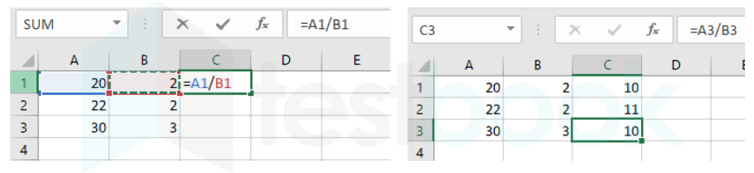
The correct answer is It should always begin with an = (equal) sign.

- Creating a formula in Excel
- To create a simple formula to add, subtract, multiply or divide values in your worksheet
- Simple formulas always start with an equal sign (=), followed by constants that are numeric values and calculation operators such as plus (+), minus (-), an asterisk(*), or forward-slash (/).
- MS-Excel
- It is a spreadsheet program for data analysis and documentation.
- It contains a number of rows and columns, where the intersection of a column and cell and a row is a "cell".
- Each cell contains one point of data.
- It is developed by Microsoft.
- It features calculation, graphing tools, pivot tables.

- All Excel formulas begin with an equal to sign (=)
- After the equal symbol, you enter either a calculation or function
- For example, to add up values in cells B1 through B5, you can either:
- Type the entire equation: = B1+B2+B3+B4+B5
- Use the SUM function: = SUM(B1: B5)
- Press the Enter key to complete the formula.